


前言:
最近使用宝塔面板一键部署了WordPress导航网站,网站在HTTP协议下运行一切正常。配置SSL证书并强制HTTPS访问后,出现了后台无法登录、CSS/JS样式文件不加载导致页面错乱、CDN回源504超时等问题。
本文分享完整的修复方案,无需复杂操作,按照步骤修改即可解决所有HTTPS兼容问题。
一、核心修复:修改系统代码文件
步骤1:修改 functions.php 文件
打开网站根目录 wp-includes/functions.php,找到代码 require( ABSPATH . WPINC . '/option.php' );(约第8行),在下方添加以下代码,修复HTTPS静态资源加载异常:
// 修复HTTPS静态资源加载问题
add_filter('script_loader_src', 'agnostic_script_loader_src', 20,2);
function agnostic_script_loader_src($src, $handle) {
    return preg_replace('/^(http|https):/', '', $src);
}
add_filter('style_loader_src', 'agnostic_style_loader_src', 20,2);
function agnostic_style_loader_src($src, $handle) {
    return preg_replace('/^(http|https):/', '', $src);
}
步骤2:完整替换 wp-config.php 配置文件
wp-config.php 是WordPress核心配置文件,手动添加代码容易出错。为了新手操作更简单、不报错,直接将下方完整代码复制,替换网站根目录原 wp-config.php 的全部内容,即可强制开启HTTPS、适配CDN、修复后台登录问题:
P*# Jg,>3/]afnL' );
define( 'SECURE_AUTH_KEY',  '&!PZ)LWc-j#C~ay$8N$`}OU2qH01;R;P,l;qj+1lhlYB^b8km^b:Daj&!QO-qm3m' );
define( 'LOGGED_IN_KEY',    'k^VK_EEif%5.Af4D*9uc::97^RTU?S-2xy7a!SO]&cRzfD/^AgZwnyT(7y#YW38L' );
define( 'NONCE_KEY',        'w=gY{S,vlp#0*{Mc+KR[vF~*4o-cAvt&hTdkU!@]Tmm$Znm~0s' );
define( 'SECURE_AUTH_SALT', 'hKvkvm&o' );
define( 'NONCE_SALT',       '`4Z(G:fq I3XQ9V$!>P2Jf' );

/**#@-*/

/**
 * WordPress database table prefix.
 *
 * You can have multiple installations in one database if you give each
 * a unique prefix. Only numbers, letters, and underscores please!
 *
 * At the installation time, database tables are created with the specified prefix.
 * Changing this value after WordPress is installed will make your site think
 * it has not been installed.
 *
 * @link https://developer.wordpress.org/advanced-administration/wordpress/wp-config/#table-prefix
 */
$table_prefix = 'wp_';

/**
 * For developers: WordPress debugging mode.
 *
 * Change this to true to enable the display of notices during development.
 * It is strongly recommended that plugin and theme developers use WP_DEBUG
 * in their environments.
 *
 * For information on other constants that can be used for debugging,
 * visit the documentation.
 *
 * @link https://developer.wordpress.org/advanced-administration/debug/debug-wordpress/
 */
define( 'WP_DEBUG', false );

/* 👇 正确位置:添加SCDN HTTPS适配代码(唯一不报错的位置) */
if (isset($_SERVER['HTTP_X_FORWARDED_PROTO']) && $_SERVER['HTTP_X_FORWARDED_PROTO'] === 'https') {
    $_SERVER['HTTPS'] = 'on';
}

/* That's all, stop editing! Happy publishing. */

/** Absolute path to the WordPress directory. */
if ( ! defined( 'ABSPATH' ) ) {
	define( 'ABSPATH', __DIR__ . '/' );
}

/** Sets up WordPress vars and included files. */
require_once ABSPATH . 'wp-settings.php';
二、后台修改站点URL(必做操作)
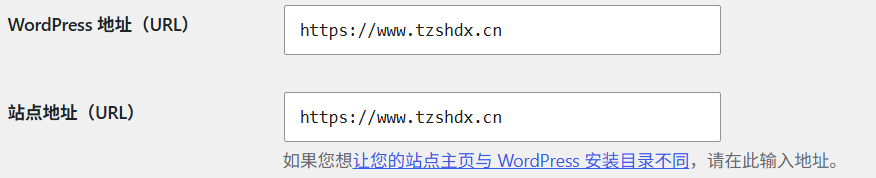
代码修改完成后,即可正常登录WordPress后台,按照以下步骤修改站点地址:
1. 点击后台菜单 设置 → 常规
2. 将以下两个地址修改为 HTTPS 开头 的域名:
WordPress 地址 (URL)
站点地址 (URL)
修改完成后点击「保存更改」,重启宝塔站点或服务器,让配置生效。
三、效果验证与问题排查
使用HTTPS访问你的域名,查看浏览器地址栏状态:
✅ 显示小锁图标:HTTPS配置成功,网站样式、后台登录、CDN访问全部正常;
⚠️ 显示圆圈叹号:网站内存在HTTP协议的图片/外部链接,将其替换为HTTPS即可修复。

按照以上步骤操作后,WordPress配置HTTPS后无法登录后台、页面样式丢失、CDN 504超时等问题全部解决。
文章声明:以上内容(如有图片或视频在内)除非注明,否则均为TS博客 | 原郁铭阳博客原创文章,转载或复制请以超链接形式并注明出处。
本文作者:TS博客本文链接:https://tzshdx.cn/?id=11


还没有评论,来说两句吧...